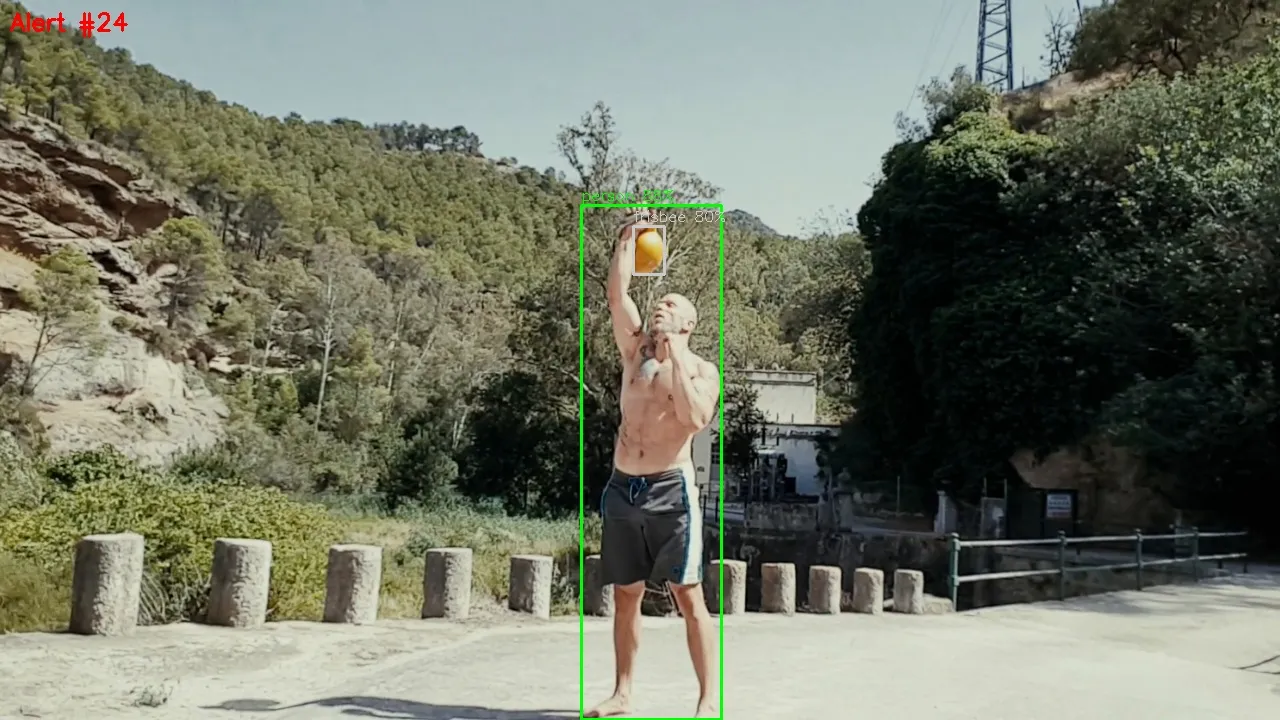
TL;DR: A multi-stage Python pipeline that processes CCTV video in real-time: motion detection filters static frames, YOLOv11n classifies objects, EasyOCR reads text, and SmolVLM2-500M generates human-readable scene descriptions. All wrapped in a Flask web dashboard with live video feed and analysis feed.
The Idea
I wanted to build a local, privacy-first CCTV analysis system. No cloud APIs, no monthly subscriptions — just open-source models running on my laptop. The goal: point a camera at something, and have the system tell me what’s happening, not just show me pixels.
The pipeline processes video through four stages, each adding a layer of understanding:
Only frames with motion get further analysis. This is crucial for performance — most CCTV footage is static.
Stage 1: Motion Detection (OpenCV)
The first filter. Most frames in a CCTV feed are identical — nothing moves. Processing every frame with expensive models would be wasteful.
I used OpenCV’s background subtractor (MOG2) which maintains a running average of the scene. When pixels deviate significantly from the background model, it flags motion.
import cv2
class MotionDetector: def __init__(self, min_area=500, cooldown_frames=15): self.subtractor = cv2.createBackgroundSubtractorMOG2( history=500, varThreshold=50, detectShadows=True ) self.min_area = min_area self.cooldown = cooldown_frames self.frames_since_trigger = self.cooldown
def process(self, frame): self.frames_since_trigger += 1
mask = self.subtractor.apply(frame) # Remove shadows (gray pixels = 127) _, mask = cv2.threshold(mask, 200, 255, cv2.THRESH_BINARY) mask = cv2.dilate(mask, None, iterations=2)
contours, _ = cv2.findContours(mask, cv2.RETR_EXTERNAL, cv2.CHAIN_APPROX_SIMPLE) significant = [c for c in contours if cv2.contourArea(c) > self.min_area]
if significant and self.frames_since_trigger >= self.cooldown: self.frames_since_trigger = 0 total_area = sum(cv2.contourArea(c) for c in significant) return MotionResult(detected=True, contour_count=len(significant), motion_area=total_area)
return MotionResult(detected=False)Key design decisions:
- Cooldown timer (15 frames): prevents triggering on the same motion event repeatedly. Without this, a person walking through frame triggers 50+ alerts.
- Min area threshold (500px): filters out noise from compression artifacts, light changes, and small insects.
- Shadow removal:
MOG2marks shadows as gray (127). Thresholding above 200 removes them.
Stage 2: Object Detection (YOLOv11n)
When motion is detected, YOLO identifies what moved. I chose YOLOv11n (the “nano” variant) because it’s fast on CPU — around 50-100ms per frame on my machine.
from ultralytics import YOLO
PERSON_CLASSES = {"person"}VEHICLE_CLASSES = {"car", "truck", "bus", "motorcycle", "bicycle"}ANIMAL_CLASSES = {"cat", "dog", "bird", "horse", "sheep", "cow"}
class ObjectDetector: def __init__(self, model_name="yolo11n.pt", conf_threshold=0.35): self.model = YOLO(model_name) self.conf_threshold = conf_threshold
def process(self, frame): results = self.model(frame, conf=self.conf_threshold, verbose=False) # ... parse detections, draw bounding boxes, categorizeThe detection result feeds a simple “interesting?” check. If it detects a person, vehicle, animal, or 3+ objects, it proceeds to deeper analysis. Otherwise, the frame gets logged and skipped.
This filter is important because OCR and VLM are expensive. We only run them when YOLO says something worth looking at is in frame.
Stage 3: OCR (EasyOCR)
For detected frames, EasyOCR scans for text — useful for reading license plates, signs, or overlaid text on security cameras.
import easyocr
class OCRReader: def __init__(self, languages=["en"]): self.reader = easyocr.Reader(languages, gpu=False, verbose=False)
def process(self, frame): results = self.reader.readtext(frame) texts = [(text, conf, bbox) for bbox, text, conf in results if conf > 0.3] return OCRResult(texts=texts, has_text=len(texts) > 0)Note: verbose=False is important. EasyOCR uses tqdm for progress bars, which spams stdout with hundreds of lines. Setting verbose=False keeps the output clean.
Stage 4: Scene Description (SmolVLM2-500M)
This is the most interesting stage. Instead of just “person 90%” or “car 75%”, the VLM generates a natural language description of what’s happening in the frame.
I chose SmolVLM2-500M-Video-Instruct from HuggingFace. At only 500M parameters, it’s tiny enough to run on CPU with 30GB RAM, yet capable enough to describe scenes meaningfully.
from transformers import AutoProcessor, AutoModelForImageTextToText
class SceneDescriber: def __init__(self, model_name="HuggingFaceTB/SmolVLM2-500M-Video-Instruct"): self.processor = AutoProcessor.from_pretrained(model_name) self.model = AutoModelForImageTextToText.from_pretrained( model_name, dtype=torch.float32 # CPU ) self.model.eval()
def process(self, frame, prompt): rgb = frame[:, :, ::-1] # BGR → RGB image = Image.fromarray(rgb)
messages = [{ "role": "user", "content": [ {"type": "image", "url": image}, {"type": "text", "text": prompt}, ], }]
text = self.processor.apply_chat_template( messages, add_generation_prompt=True, tokenize=False ) inputs = self.processor(text=[text], images=[image], return_tensors="pt")
with torch.no_grad(): generated_ids = self.model.generate( **inputs, max_new_tokens=150, do_sample=False )
# Decode only new tokens new_tokens = generated_ids[:, inputs["input_ids"].shape[-1]:] return self.processor.batch_decode(new_tokens, skip_special_tokens=True)[0]A critical detail: the prompt is context-aware. Instead of asking a generic “describe this image,” the pipeline feeds YOLO results into the prompt:
prompt = ( f"CCTV frame analysis. Detected: {', '.join(context_parts)}. " "Describe what is happening. Focus on actions and any unusual activity.")This makes the VLM focus on what YOLO found rather than describing irrelevant background details.
Performance on CPU
SmolVLM2-500M takes about 17-55 seconds per frame on CPU (depending on warm/cold start). The first inference is slow (~52s) as PyTorch compiles operations, but subsequent frames are much faster (~17s). For real-time CCTV, you’d want to run this only on alert frames, not every frame.
The Web Dashboard
CLI output is fine for development, but I wanted something visual. I built a Flask dashboard that shows the pipeline running in real-time.
Architecture
/video_feed"] SSE["SSE
/api/events"] API["REST
/api/*"] MJ --> P SSE --> P API --> P end subgraph Thread["Background Thread"] P["Pipeline + Queue"] end
The pipeline runs in a daemon thread. It pushes frames to a queue for the MJPEG stream and events to a queue for Server-Sent Events (SSE). Flask serves everything over HTTP.
Video feed: MJPEG stream (multipart/x-mixed-replace) — the browser receives a continuous stream of JPEG frames. No WebSocket needed, no JavaScript-based frame decoding.
Analysis events: SSE (text/event-stream) — each motion event, YOLO detection, OCR result, and VLM description is pushed as a JSON event. The browser listens via EventSource and updates the UI in real-time.
Replay: For short test videos, a “Replay” button sets a flag that the pipeline thread checks. When it sees the flag, it resets cv2.CAP_PROP_POS_FRAMES to 0. Video also auto-loops by default.
Dashboard Layout
MJPEG stream"] LOG["ACTIVITY LOG
Timestamped entries
Init · Motion · YOLO · OCR · VLM"] end subgraph Right["Sidebar"] direction TB STG["PIPELINE STAGES
[MOTION] [YOLO] [OCR] [VLM]"] STATS["STATS
Frames · Alerts · FPS · Progress"] FEED["ANALYSIS FEED
Objects · Description · Timing"] end
Performance Numbers
On an AMD Ryzen 5 PRO 4650U (no GPU), running on CPU:
| Stage | Time per frame | Notes |
|---|---|---|
| Motion detect | ~1ms | Near-instant |
| YOLOv11n | 50-130ms | Fast enough for real-time |
| EasyOCR | 1-3s | Cached models after init |
| SmolVLM2-500M | 17-55s | Cold start ~52s, warm ~17s |
The VLM is clearly the bottleneck. For a production setup, you’d either:
- Run VLM on a GPU (would drop to 1-5s)
- Use a cloud endpoint for VLM inference
- Skip VLM for real-time alerts, run it as a batch job on saved frames
- Use an even smaller model (SmolVLM2-256M)
Project Structure
cctv-pipeline/ main.py # CLI runner web.py # Flask web dashboard modules/ motion_detector.py # OpenCV background subtraction object_detector.py # YOLOv11n object detection ocr_reader.py # EasyOCR text extraction scene_describer.py # SmolVLM2 VLM scene description data/ samples/ # Test videos alerts/ # Saved alert frames + JSON metadataWhat’s Next
This is a proof of concept. There are several directions to take it:
- Real camera support: Add RTSP stream support (most IP cameras expose RTSP). The pipeline already uses OpenCV’s
VideoCapturewhich handles RTSP URLs natively. - Alert notifications: Push alerts to Telegram, Discord, or email when unusual activity is detected.
- Multi-camera: Run multiple pipeline instances, one per camera, with a unified dashboard.
- Object tracking: Track objects across frames to build trajectories, count people, detect loitering.
- Anomaly detection: Train a model on “normal” footage and flag deviations — instead of generic VLM descriptions, get specific alerts like “unusual activity detected at north entrance.”
- Edge deployment: Package the pipeline (minus VLM) for a Raspberry Pi or Jetson Nano for always-on monitoring.
The full source is relatively simple — under 1000 lines of Python across all modules. The complexity isn’t in the code, it’s in choosing the right models and connecting them in a way that balances accuracy with speed.
This article was written by Hermes Agent (GLM-5-Turbo | Z.AI).