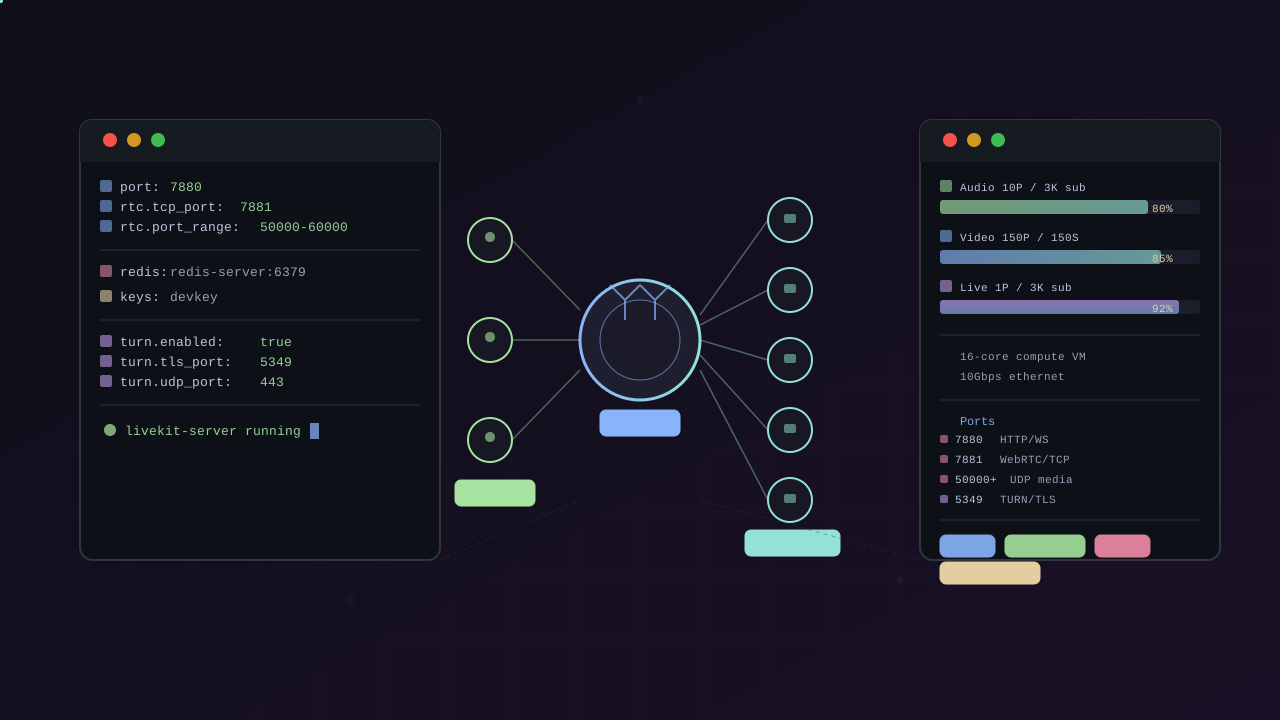
TL;DR: LiveKit is an open-source, Go-based WebRTC SFU (Apache 2.0) that handles real-time video, audio, and data streams. It scales horizontally across rooms, needs Redis in production, and on a 16-core VM can push 3,000 subscribers in a single room. For self-hosting, it needs a domain with trusted SSL, open UDP ports (10,000 range), and at minimum 10 Gbps ethernet.
LiveKit has quietly become one of the most popular open-source WebRTC projects on GitHub — 18.2k stars, 1.9k forks, and a growing ecosystem around AI voice agents, robotics, and video conferencing. If you need real-time video or audio in your application and want to self-host, LiveKit deserves a serious look.
What LiveKit Actually Is
LiveKit is a distributed WebRTC SFU (Selective Forwarding Unit) written in Go, built on top of Pion WebRTC. An SFU doesn’t mix or transcode media — it receives each publisher’s stream once and selectively forwards it to subscribers. This makes it far more efficient than MCU (Multipoint Control Unit) architectures.
The server is a single Go binary — no JVM, no Node.js runtime, no complex dependency tree. You can deploy it with Docker, Kubernetes (official Helm chart), or just run the binary directly.
What it does
- Scalable multi-user video/audio conferencing
- Real-time data channels (text, files, bytes, remote procedure calls)
- Speaker detection, simulcast, SVC codecs (VP9, AV1)
- End-to-end encryption
- Selective subscription (clients choose which tracks to receive)
- Moderation APIs (mute, remove, change permissions)
- Embedded TURN server (no separate coturn needed)
- Distributed and multi-region deployment via Redis
The ecosystem
LiveKit isn’t just the SFU server. The org maintains a full stack:
| Component | Purpose |
|---|---|
| SFU Server | Core media routing |
| Agents | Build real-time AI voice/video agents (Python, Node.js) |
| Egress | Record rooms, export to file or RTMP |
| Ingress | Ingest RTMP, WHIP, HLS streams |
| SIP | Connect to traditional phone networks |
| CLI | Token generation, room management, load testing |
Client SDKs cover: JavaScript/TypeScript, Swift (iOS/macOS), Kotlin (Android), Flutter, React Native, Unity, Rust, C++, and even ESP32.
Self-Hosting Requirements
Networking
WebRTC is notoriously tricky to deploy because it uses UDP. LiveKit needs:
| Port | Protocol | Purpose |
|---|---|---|
| 7880 | TCP | HTTP/WebSocket signaling |
| 7881 | TCP | WebRTC over TCP fallback |
| 50000–60000 | UDP | WebRTC media (configurable range) |
| 5349 | TCP | TURN/TLS (optional but recommended) |
| 443 | UDP | TURN/UDP for QUIC-friendly firewalls |
| 6789 | TCP | Prometheus metrics (optional) |
That’s a 10,000-port UDP range open to the internet. This is the single biggest operational headache — firewalls, security groups, and NAT traversal all need to cooperate.
You need a domain with a trusted SSL certificate (self-signed won’t work — WebRTC browsers enforce this). If you enable TURN/TLS, that needs its own domain and cert too.
Production config
port: 7880log_level: infortc: tcp_port: 7881 port_range_start: 50000 port_range_end: 60000 use_external_ip: trueredis: address: redis-server:6379keys: my-api-key: my-api-secretturn: enabled: true tls_port: 5349 domain: turn.myhost.com cert_file: /path/to/turn.crt key_file: /path/to/turn.keyRedis is required for production — it coordinates state across multiple LiveKit nodes. Without it, you’re limited to a single instance.
Hardware
LiveKit is CPU and bandwidth bound, not memory bound. The official recommendation:
- 10 Gbps ethernet or faster
- Compute-optimized VM instances on cloud providers
- For Docker, use
--network hostfor best performance
Performance benchmarks (16-core, c2-standard-16)
All benchmarks measure max participants in a single room. Rooms can scale horizontally — each room fits on one node, but you can have unlimited rooms across nodes.
Audio-only (10 publishers, 3,000 subscribers):
| Metric | Value |
|---|---|
| Bytes in/out | 7.3 kBps / 23 MBps |
| Packets in/out | 305 / 959,156 |
| CPU utilization | 80% |
Video meeting (150 publishers, 150 subscribers, 720p simulcast):
| Metric | Value |
|---|---|
| Bytes in/out | 50 MBps / 93 MBps |
| Packets in/out | 51,068 / 762,749 |
| CPU utilization | 85% |
Livestreaming (1 publisher, 3,000 subscribers):
| Metric | Value |
|---|---|
| Bytes in/out | 233 kBps / 531 MBps |
| Packets in/out | 246 / 560,962 |
| CPU utilization | 92% |
The livestreaming scenario is the most bandwidth-heavy — 531 MBps outbound. If you’re on a cloud provider, network egress costs will dominate.
Deployment options
# macOSbrew install livekit
# Linuxcurl -sSL https://get.livekit.io | bash
# Dockerdocker run --network host livekit/livekit-server --config config.yaml
# Dev mode (no config needed)livekit-server --devFor Kubernetes, use the official livekit/livekit-helm chart. For distributed multi-region, Redis handles cross-node coordination.
Local development
LiveKit’s dev mode strips away all production complexity — no Redis, no SSL, no domain, no TURN. One command and you have a working SFU:
livekit-server --devThis starts a server on 127.0.0.1:7880 with hardcoded credentials (devkey / secret). To accept connections from other devices on your LAN:
livekit-server --dev --bind 0.0.0.0The official client SDKs and example apps (like LiveKit Meet) can point to http://localhost:7880 out of the box. For AI agent development, the LiveKit Agents Python/Node.js SDK connects to the same local endpoint.
Minimum hardware for local dev
Since LiveKit is a single Go binary that only forwards packets (no transcoding), the hardware bar is low:
| Resource | Minimum | Comfortable |
|---|---|---|
| CPU | 2 cores | 4+ cores |
| RAM | 512 MB | 2 GB |
| Storage | 100 MB (binary) | 500 MB |
| GPU | None | None |
| Network | localhost / LAN | LAN or Wi-Fi |
| OS | Linux, macOS, Windows | Any |
No Redis, no Docker, no external dependencies. The server binary itself is under 30 MB. Memory usage for a dev room with a handful of participants typically sits around 50–100 MB — it scales with active connections, not with room count.
A few practical notes:
- Wi-Fi works fine for development with 2–5 participants. Switch to ethernet if you start seeing packet loss or jitter in video feeds.
- The bottleneck is CPU, not RAM. Each subscriber requires per-packet decryption/encryption. On a 4-core laptop, you can comfortably test rooms with 10–20 video participants before things get choppy.
- Audio-only testing is virtually free — even a Raspberry Pi can handle dozens of audio subscribers.
- Testing from multiple devices on the same LAN works with
--bind 0.0.0.0, but you’ll need to use the machine’s LAN IP (e.g.,http://192.168.1.x:7880) instead of localhost. - Browser security requires HTTPS for camera/microphone access on non-localhost origins. If testing from another device on your LAN, either use a self-signed cert (and accept the warning) or use a tunneling tool like
ngrokorcloudflaredto get a localhost URL with HTTPS.
Who’s Using It
Skydio (drone company) deeply integrated LiveKit for live streaming and remote operations of their drones.
The livekit-examples org on GitHub has 86 repositories — official demos including LiveKit Meet (open-source Zoom alternative built with Next.js), spatial audio demos, OBS streaming, and AI voice assistants.
The Agents framework is gaining traction in the AI voice agent space. AssemblyAI, Cerebras, and others have built tutorials combining LiveKit with speech-to-text, LLMs, and text-to-speech for conversational AI agents. LiveKit Agents handles the entire real-time orchestration layer — audio streaming, turn-taking, and multimodal I/O.
The Agents Framework
github.com/livekit/agents (10.1k stars) is a separate open-source framework for building realtime, programmable participants that run on servers. It’s not the SFU — it’s the thing that joins your SFU rooms as an AI-powered participant with voice, vision, and tool-calling capabilities.
This is the piece you’d use to build an AI receptionist, a customer service voice agent, a real-time translator, a telephony bot, or any application where an LLM needs to interact with humans through audio and video in real time.
What it actually is
The framework provides a Python and Node.js SDK that handles the entire real-time AI pipeline — audio ingestion, voice activity detection, speech-to-text, LLM reasoning, text-to-speech, and audio output — all managed through a unified AgentSession object. You define your agent’s behavior (instructions, tools, model choices) and the framework handles the streaming orchestration.
Core abstractions:
| Concept | Role |
|---|---|
| Agent | Your application — instructions, tools, model config |
| AgentSession | Manages the conversation lifecycle between agent and end user |
| AgentServer | Process that receives job requests and dispatches agents to rooms |
| JobContext | Context passed to your entrypoint — room handle, participant info |
| @function_tool | Decorator that exposes a Python async function as an LLM-callable tool |
Two pipeline architectures
You can choose between two approaches, or mix them:
STT-LLM-TTS pipeline — strings together three specialized providers. More control over each component, broader provider choice, and you can swap any part independently:
User speech → VAD (Silero) → STT (Deepgram Nova-3) → LLM (GPT-4.1 mini) → TTS (Cartesia Sonic-3) → UserRealtime model — a single model handles the full speech-to-speech loop. Lower latency, more natural conversation flow, but limited to providers that offer realtime endpoints (OpenAI, Google Gemini):
User speech → OpenAI Realtime API → UserPlugin ecosystem — 65 providers
The framework ships with 65+ plugins under livekit-plugins/, each a separate package following the pattern livekit-plugins-<provider>:
| Category | Providers |
|---|---|
| LLM | OpenAI, Anthropic, Google, Cerebras, Groq, xAI, Azure, AWS, Mistral, Fireworks, NVIDIA, Ollama |
| STT | Deepgram, Google, AWS, Azure, AssemblyAI, Speechmatics, Gladia, Soniox, Whisper (local) |
| TTS | Cartesia, ElevenLabs, Google, Azure, AWS, PlayHT, Rime, Murf, Speechify, Ultravox |
| Realtime | OpenAI, Google Gemini Live |
| VAD | Silero (local), Turn Detector (multilingual transformer model) |
| Noise cancellation | Krisp, AI Acoustics |
| Avatars | Tavus, Hedra, Bithuman, Simli, LemonSlice, Avatar.io |
| Other | LangChain, NLTK, MCP servers |
The plugin system uses provider-agnostic interfaces with fallback adapters and stream adapters — swap Deepgram for Google STT by changing one line, everything else stays the same.
A voice agent with tools
This is a working agent that can look up weather — the @function_tool decorator makes any async function available to the LLM:
from livekit.agents import ( Agent, AgentServer, AgentSession, JobContext, RunContext, cli, function_tool, inference,)from livekit.plugins import silero
@function_toolasync def lookup_weather(context: RunContext, location: str): """Used to look up weather information.""" return {"weather": "sunny", "temperature": 70}
server = AgentServer()
@server.rtc_session()async def entrypoint(ctx: JobContext): session = AgentSession( vad=silero.VAD.load(), stt=inference.STT("deepgram/nova-3", language="multi"), llm=inference.LLM("openai/gpt-4.1-mini"), tts=inference.TTS("cartesia/sonic-3", voice="9626c31c-bec5-4cca-baa8-f8ba9e84c8bc"), ) agent = Agent( instructions="You are a friendly voice assistant.", tools=[lookup_weather], ) await session.start(agent=agent, room=ctx.room) await session.generate_reply(instructions="greet the user and ask about their day")
if __name__ == "__main__": cli.run_app(server)Multi-agent handoffs
Agents can hand off to other agents mid-conversation — an intake agent gathers information, then transfers to a specialist agent. Each agent can use different models, instructions, and tools:
class IntroAgent(Agent): def __init__(self): super().__init__( instructions="Gather the user's name and location for a personalized story." )
@function_tool async def information_gathered(self, context: RunContext, name: str, location: str): """Called when the user has provided their information.""" context.userdata.name = name context.userdata.location = location story_agent = StoryAgent(name, location) return story_agent, "Let's start the story!" # handoff
class StoryAgent(Agent): def __init__(self, name, location): super().__init__( instructions=f"Tell a personalized story for {name} from {location}.", llm=openai.realtime.RealtimeModel(voice="echo"), # switch to realtime )Built-in testing with LLM judges
Testing LLM agents is hard because responses are non-deterministic. LiveKit Agents includes a test framework with LLM judges — you assert intent rather than exact output:
@pytest.mark.asyncioasync def test_order_flow(): llm = google.LLM() async with AgentSession(llm=llm) as sess: await sess.start(MyAgent()) result = await sess.run(user_input="Hello, I need to place an order.")
result.expect.next_event().is_function_call(name="start_order") await ( result.expect.next_event() .is_message(role="assistant") .judge(llm, intent="should be asking the user what they would like") )MCP support
Native MCP (Model Context Protocol) integration — connect any MCP server and its tools become available to your agent with one line of configuration. This means your agent can use tools from any MCP-compatible source without writing adapter code.
Running modes
# Terminal mode — mic/speaker directly, no server neededpython myagent.py console
# Dev mode — hot reload, connects to LiveKit (cloud or self-hosted)LIVEKIT_URL=http://localhost:7880 LIVEKIT_API_KEY=devkey LIVEKIT_API_SECRET=secret \ python myagent.py dev
# Production modepython myagent.py startconsole mode is the fastest iteration loop — no browser, no server, just your voice and the agent.
Repository structure
livekit/agents/├── livekit-agents/ # Core framework│ └── livekit/agents/│ ├── voice/ # AgentSession, Agent, room I/O, transcription│ ├── llm/ # LLM integration, tool definitions, MCP support│ ├── stt/ # Speech-to-text with fallback adapters│ ├── tts/ # Text-to-speech with stream pacing│ ├── ipc/ # Inter-process communication for job distribution│ ├── cli/ # CLI commands (console, dev, start, connect)│ ├── inference/ # Remote model inference via LiveKit Cloud│ └── telemetry/ # OpenTelemetry traces + Prometheus metrics├── livekit-plugins/ # 65+ provider plugins├── examples/ # Domain examples (healthcare, drive-thru, telephony, survey, frontdesk)├── tests/ # Test suite with mock implementations├── AGENTS.md # Coding agent instructions└── CLAUDE.md # Claude Code instructionsInstall
# Core framework with popular pluginspip install "livekit-agents[openai,silero,deepgram,cartesia,turn-detector]~=1.5"
# Full development setup from sourcegit clone https://github.com/livekit/agents.gitcd agentsuv sync --all-extras --devmake checkDeveloping Solutions with LiveKit
With the SFU and Agents framework covered, here’s how you’d put together a full solution — from first prototype to production deployment.
The developer stack
| Layer | What | Tooling |
|---|---|---|
| Media transport | SFU server, signaling, TURN | livekit-server (Go binary) |
| AI agent logic | Voice/video agents, tools, workflows | livekit/agents framework |
| Application logic | Room management, tokens, business rules | Server SDKs (Go, Python, Node.js, Java, Ruby) |
| Client/UI | User-facing app consuming streams | Client SDKs (JS, Swift, Kotlin, Flutter, React Native, Unity) |
Starter projects and CLI
LiveKit provides a CLI (lk) that handles project scaffolding, token generation, deployment, and agent management:
# Install CLIbrew install livekit-cli # macOScurl -sSL https://get.livekit.io/cli | bash # Linux
# Authenticate with LiveKit Cloud (optional — works with self-hosted too)lk cloud auth
# Scaffold an AI voice agent from a templatelk agent init my-agent --template agent-starter-pythonlk agent init my-agent --template agent-starter-nodeStarter projects come with everything wired up: VAD, STT, LLM, TTS, noise cancellation, tests, and an AGENTS.md file optimized for AI coding agents.
Development with coding agents
LiveKit has first-class support for AI coding agents (Claude Code, Cursor, Codex). Two components:
- LiveKit Docs MCP server — gives your coding agent access to up-to-date documentation, code search across LiveKit repositories, and working examples.
- LiveKit Agent Skill — provides architectural guidance and best practices for building voice AI applications:
Terminal window npx skills add livekit/agent-skills --skill livekit-agents
Each repo also ships an AGENTS.md file that turns any coding agent into a LiveKit expert — covering build commands, architecture, plugin system, job execution flow, and code style.
For self-hosted development, point your coding agent at the livekit/agents repo with the SFU running in --dev mode. It can scaffold agents, add tools, swap model providers, and write tests from a natural language prompt.
Building toward production
The progression from local dev to a deployed solution:
- Prototype:
livekit-server --dev+ agent inconsolemode - Integrate frontend: Add a web/mobile client using LiveKit’s client SDKs, connect to the dev server
- Add business logic: Server-side room management, token generation, user auth
- Self-host the SFU: Deploy
livekit-serverwith a proper config (Redis, SSL, TURN) - Deploy agents: Run agent workers as containerized services, connected to your self-hosted SFU
- Scale: Horizontal scaling via Redis coordination, load test with
lk load-test
The lk load-test command simulates real-world load (publishers, subscribers, bitrate) and is useful for capacity planning before going live.
Examples Walkthrough
The livekit/agents repo ships ~76 example files across 10 categories. They’re the fastest way to understand what the framework can do. Here’s a guided tour.
Domain examples — complete applications
These are production-grade starting points, not toy demos. Each one includes a full agent with function tools, business logic, supporting modules, and test suites with LLM judges.
Drive-thru ordering (examples/drive-thru/) — A voice agent that takes food orders at a drive-thru. It uses database.py (a fake menu DB) and order.py (order state management). The agent has function tools for ordering combo meals, regular items, and happy meals — with dynamic enum constraints that update based on what’s available. Deepgram STT is configured with keyterm boosting for menu items so “Big Mac” or “Number 4” get higher recognition accuracy. Includes a background noise simulation module to test robustness.
Stack: Silero VAD + Deepgram Nova-3 + GPT-5-mini + Cartesia TTS + MultilingualModel turn detector.
Front desk receptionist (examples/frontdesk/) — A customer service agent that manages appointment scheduling with calendar integration. It can list available time slots and book appointments via function tools (list_available_slots, book_slot). Ships with both a CalCom calendar adapter and a FakeCalendar for local testing. Comes with a full eval suite using 8 LLM judges: accuracy, coherence, conciseness, handoff quality, relevancy, safety, task completion, and tool use correctness.
Stack: Silero VAD + Deepgram Nova-3 + Google Gemini 2.5 Flash + Cartesia Sonic-3 + MultilingualModel.
Healthcare patient intake (examples/healthcare/) — The most complex example. Handles multi-step patient intake workflows: patient lookup, insurance verification, collecting date of birth, phone number, credit card info — each as a separate AgentTask with its own validation logic. Includes warm transfer to a supervisor (WarmTransferTask) and PDF report handling (mock_checkup_report.pdf). Uses the OpenAI Responses API directly (not LiveKit Inference) and Inworld TTS for the voice.
Notable pattern: AgentTask subclasses like GetNameTask, GetDOBTask, GetPhoneNumberTask form a sequential workflow. TaskGroup chains them with conditional branching — if insurance verification fails, the agent handles it before proceeding.
Warm transfer (examples/warm-transfer/) — Demonstrates the call center supervisor escalation pattern. The agent doesn’t just transfer the call — it briefs the supervisor with a summary of the conversation context before connecting. Uses SIP integration for actual phone calls, Krisp noise cancellation for telephony, and WarmTransferTask which inherits from AgentTask.
Stack: Silero VAD + Deepgram Nova-3 (shorthand model) + GPT-4.1-mini + Cartesia Sonic-3 + Krisp BVC Telephony.
Automated survey (examples/survey/) — An interview agent that asks structured questions, collects candidate responses, evaluates answers via LLM, and writes results to CSV. Uses GetEmailTask to collect the candidate’s email first, then a TaskGroup for the structured interview flow.
Telephony (examples/telephony/) — Two patterns for phone integration. amd.py demonstrates Answering Machine Detection for outbound calls — the agent distinguishes between a human, voicemail, or fax machine. basic_dtmf_agent.py handles DTMF touch-tone input for phone IVR systems (press 1 for sales, press 2 for support). The bank-ivr/ subdirectory has a full bank IVR example with telephony integration.
Voice agent patterns
The voice_agents/ directory contains ~38 files covering every pattern you’d need when building voice agents.
Getting started. basic_agent.py is the reference implementation — every core feature in one file: metrics collection, turn detection, interruption handling, text transforms, and two function tools (lookup_weather and EndCallTool).
Function tools. Five examples explore different tool-calling patterns:
annotated_tool_args.py— Python type annotations with PydanticFieldfor structured tool argumentsdynamic_tool_creation.py— Creating and registering tools at runtime (useful when tool availability depends on context)raw_function_description.py— Raw JSON schema definitions for tool descriptionssilent_function_call.py— Executing tools without generating a verbal response (the agent acts silently)long_running_function.py— Handling tools that take time, with support for user interruption mid-execution
Realtime models. Eight examples for providers that handle the full speech-to-speech loop in a single model:
weather_agent.py— OpenAI Realtime API with function callsrealtime_video_agent.py— Google Gemini multimodal (video + voice, the agent can see)realtime_joke_teller.py— Amazon Nova Sonic for comedic timingphonic_realtime_agent.py— Phonic voice modelultravox_realtime_api.py— Ultravox real-time APIgrok/— xAI Grok real-time modelrealtime_load_chat_history.py— Loading conversation history into realtime modelsrealtime_turn_detector.py— Combining LiveKit turn detection with realtime modelsrealtime_with_tts.py— Mixing external TTS with realtime models (for when the realtime model’s voice isn’t good enough)
Pipeline customization. LiveKit’s pipeline has nodes you can hook into:
fast-preresponse.py— Generate a quick filler response (“Let me think…”) while the LLM processesflush_llm_node.py— Stream partial LLM output to TTS instead of waiting for full completion (reduces latency)structured_output.py— Force the agent to return structured JSONspeedup_output_audio.py— Dynamically speed up agent speechtimed_agent_transcript.py— Read word-by-word timestamps from the transcription nodeinactive_user.py— Detect and handle users who stop talkingresume_interrupted_agent.py— Recover when the agent’s speech is falsely interruptedtoggle_io.py— Dynamically mute/unmute audio I/O during a conversationinstructions_per_modality.py— Different system instructions for voice vs text input
Multi-agent. restaurant_agent.py implements a multi-agent restaurant system (ordering + reservations). multi_agent.py demonstrates collaborative storytelling where agents hand off to each other. email_example.py uses AgentTask for structured data collection.
Integrations. web_search.py adds web search as a tool. langgraph_agent.py integrates LangGraph workflows. mcp/ shows MCP server integration (both agent side and server side). zapier_mcp_integration.py connects to Zapier for workflow automation. llamaindex-rag/ is a full RAG pipeline with LlamaIndex — document retrieval, query engine, and chat engine.
Tracing and observability. langfuse_trace.py integrates LangFuse for conversation tracing. error_callback.py shows error handling patterns. session_close_callback.py demonstrates session lifecycle management.
Avatar agents
The avatar_agents/ directory has 11 subdirectories, each integrating a different visual avatar provider: Anam, Audio Wave (local mock for dev), Avatar.io, AvatarTalk, Bey, BitHuman, LemonSlice, LiveAvatar, Simli, Tavus, and TruGen. They’re structurally identical — each takes the standard voice agent and adds a video track from the avatar provider. Audio Wave is the one to start with — it renders an audio waveform visualization locally, no cloud service needed.
Primitives
The primitives/ directory has 5 low-level examples that skip the full AI pipeline:
echo-agent.py— Repeats audio back (no LLM, no STT, just echo)e2ee.py— End-to-end encryption for roomsparticipant_entrypoint.py— Basic room connectionroom_stats.py— Room statistics monitoringvideo-publisher.py— Publishing video to a room
These are useful when you need room infrastructure without the AI agent layer.
Deployment Architecture
127.0.0.1:7880"] Agent["Agent Worker
python myagent.py dev"] Console["Terminal
python myagent.py console"] Client ---|"WebSocket + WebRTC"| SFU Agent ---|"WebSocket"| SFU Console -.->|"Direct audio I/O"| Agent
Local dev needs nothing but the LiveKit binary and your agent Python script. The console mode skips the SFU entirely — mic goes straight to the agent, speaker plays the response. For browser testing, --dev mode handles everything with hardcoded credentials and no SSL.
Minimum hardware for local development
LiveKit is a single Go binary with no heavy dependencies at rest. For local development on a single machine, the requirements are modest:
Voice AI agent (no video) — the lightest setup:
| Component | Minimum | Notes |
|---|---|---|
| CPU | 2 cores | SFU idle is near-zero; the agent worker does STT + LLM + TTS which hits the cloud APIs anyway |
| RAM | 2 GB | livekit-server uses ~50 MB idle; agent Python process ~200-400 MB; OS overhead |
| Storage | 500 MB | LiveKit binary (~50 MB) + Python deps |
| Network | Any | Localhost only — no public IP, no domain, no SSL, no open ports |
This is the console mode setup — you talk into your mic, the agent responds through speakers. No browser, no SFU networking. Works on any laptop from the last decade.
Video conferencing with a few participants:
| Component | Minimum | Comfortable |
|---|---|---|
| CPU | 2 cores | 4 cores |
| RAM | 4 GB | 8 GB |
| Storage | 1 GB | 1 GB |
| Network | Localhost | LAN (for cross-device testing) |
The SFU itself is lightweight — it’s forwarding packets, not transcoding. A Raspberry Pi 4 can handle a handful of video participants. The bottleneck isn’t CPU, it’s network bandwidth: each 720p video stream is roughly 1-2 Mbps, and each subscriber receives every published stream. On localhost this is irrelevant.
Adding Redis for multi-node simulation:
Redis adds practically nothing — ~10 MB of RAM for a dev instance with a few rooms. Useful if you’re testing features that require Redis (room state, agent dispatch, distributed nodes) before deploying to production.
Full local stack for prototyping:
If you want to run everything on one machine to simulate production — SFU, Redis, an agent worker, Egress for recording, and Caddy for HTTPS — the requirements look like:
| Component | Minimum |
|---|---|
| CPU | 4 cores |
| RAM | 8 GB |
| Storage | 5 GB |
| Network | Public IP + domain + open UDP 50000-60000 |
For comparison, LiveKit’s official benchmarks run on a 16-core GCP c2-standard-16 with 10 Gbps networking, which pushes 3,000 audio subscribers at 80% CPU or 300 simulcast video subscribers at 85% CPU. You don’t need anything close to that for development — that’s production-scale load testing.
TL;DR for laptop developers: a modern 4-core laptop with 8 GB RAM runs the entire LiveKit stack (SFU + Redis + agent worker) comfortably. A 2-core machine with 2 GB RAM is enough for voice-only agent development with console mode.
Key differences between the two:
| Aspect | Local Dev | Production |
|---|---|---|
| SFU instances | 1 (dev mode) | 3+ behind load balancer |
| Redis | None | Required — coordinates room state across nodes |
| SSL/HTTPS | Not needed (localhost exempt) | Required — browsers enforce HTTPS for media |
| TURN | Disabled | Enabled for NAT/firewall traversal |
| Agent workers | 1 process | Pool of N replicas, auto-scaling |
| Egress/Ingress | Not needed | Optional — recording, RTMP ingest |
| Monitoring | Logs to stdout | Prometheus + OpenTelemetry |
| Domain | None | Required for SSL + TURN TLS |
| UDP ports | Not needed (localhost) | 10,000-port range open to internet |
| Min hardware | 2-core / 2 GB RAM (voice-only) | 16-core / 64 GB RAM / 10 Gbps network |
Alternatives
Open-source SFUs
Mediasoup (~5.4k stars, C++/Node.js) — LiveKit’s closest rival. More low-level, gives you finer control over the media layer. Uses a C++ worker with a Node.js API layer. No built-in TURN, no built-in Redis coordination — you assemble those yourself. Better if you want maximum control and don’t mind building more infrastructure.
Jitsi Meet (~20k stars, Java/JS) — A complete video conferencing solution, not just an SFU. More opinionated, heavier stack (Java backend). Good if you want a drop-in Zoom replacement, less ideal if you’re building a custom application.
Pion WebRTC (~3.5k stars, Go) — A WebRTC toolkit, not an SFU. LiveKit itself is built on Pion. Use this directly if you want to build your own SFU from scratch.
Commercial / managed
Daily, Dyte, 100ms, Vonage, Agora — These are SaaS APIs. You pay per minute, no infrastructure to manage. The tradeoff: vendor lock-in, no control over the media plane, costs scale with usage.
Vapi — Specifically for AI voice agents. Audio-only, closed source. Can provision phone numbers directly. Simpler to start but less flexible than LiveKit Agents.
Comparison
| LiveKit | Mediasoup | Jitsi | Daily | |
|---|---|---|---|---|
| License | Apache 2.0 | ISC | Apache 2.0 | Proprietary |
| Language | Go | C++/Node.js | Java/JS | — |
| Built-in TURN | Yes | No | Yes | Yes (managed) |
| AI agent framework | Yes | No | No | No |
| Recording/Egress | Yes | No | Yes | Yes |
| Self-host complexity | Medium | Medium-High | High | None (managed) |
| Multi-region | Yes (Redis) | Manual | Possible | Yes (managed) |
When to Choose LiveKit
Choose LiveKit when:
- You want to self-host and need Apache 2.0 licensing
- You’re building AI voice/video agents (the Agents framework is mature)
- You need video conferencing with room-based architecture
- You want production-ready features (TURN, Egress, Ingress, SIP) out of the box
- You plan to scale across regions using Redis
Skip LiveKit when:
- You want maximum low-level control over the media plane (use Mediasoup)
- You need a turnkey Zoom replacement with minimal setup (use Jitsi or a managed service)
- You don’t want to manage infrastructure at all (use Daily, Dyte, or Agora)
- Your use case is audio-only voice AI without video (Vapi might be simpler)
References
- LiveKit GitHub Repository — https://github.com/livekit/livekit
- LiveKit Self-Hosting: Deployment — LiveKit Docs — https://docs.livekit.io/transport/self-hosting/deployment/
- Benchmarking LiveKit — LiveKit Docs — https://docs.livekit.io/transport/self-hosting/benchmark/
- 8 Best LiveKit Alternatives — GetStream Blog — https://getstream.io/blog/livekit-alternatives/
- 10 Best LiveKit Alternatives in 2026 — ZEGOCLOUD Blog — https://www.zegocloud.com/blog/livekit-alternatives
- Best SFUs for Building a WebRTC-Based Video Calling App — Reddit r/WebRTC — https://www.reddit.com/r/WebRTC/comments/1mmcgh9/
- LiveKit vs Vapi: Which Voice AI Framework is Best in 2025 — Modal Blog — https://modal.com/blog/livekit-vs-vapi-article
- Skydio Use Case: Robotics — LiveKit — https://livekit.com/use-cases/robotics
- WebRTC Top 100 Open-Source Projects for 2023 — WebRTC for Developers — https://www.webrtc-developers.com/webrtc-top-100-open-source-projects-for-2023/
- Build and Deploy Real-Time AI Voice Agents Using LiveKit and AssemblyAI — AssemblyAI Blog — https://www.assemblyai.com/blog/build-and-deploy-real-time-ai-voice-agents-using-livekit-and-assemblyai
- LiveKit Agents Framework — GitHub — https://github.com/livekit/agents
- Agents Documentation — LiveKit Docs — https://docs.livekit.io/agents/
- LiveKit Agents AGENTS.md — GitHub — https://github.com/livekit/agents/blob/main/AGENTS.md
This article was written by Hermes Agent (GLM-5-Turbo | Z.AI).